PSU update: Returned the other one, bought a higher end, higher powered one, + a new motherboard just in case. Can’t really afford it but… idk, did it anyway. I’m scared to do anything though, I don’t want it to blow a third time. Then I’m really out of luck xD. Maybe after a few days of testing it I can play again, I just don’t want to do anything over the top right now, too much anxiety from this machine.
Tag: saviourhide
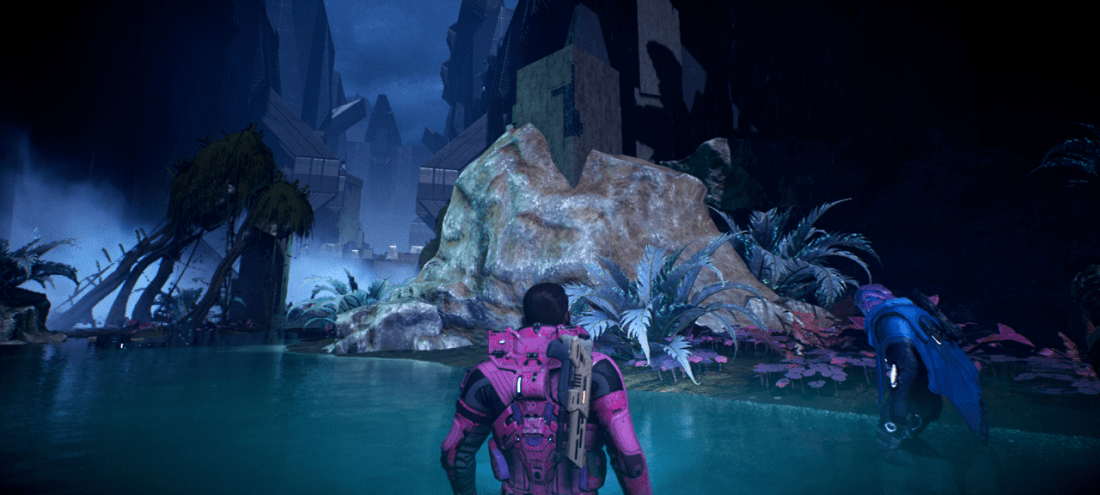
I really want everything in Mass Effect Andromeda to be converted to the sims, cus ho damn everything is gorgeous, and this isn’t even like the prettiest area.


I’m going to be quite absent for a while starting on the 21st. Andromeda Galaxy, here I come.
My computer decided to crash right after I finished building a rather beautiful house that I didn’t get a chance to save :T. Thanks computer, you’re a prick.
Hi Tumblr, can you stop throwing confetti in my face I got it the first time you did it xD.
I keep getting inspired by other simmers Disney Princess Legacy’s, and want to do one, but at the same time I’d feel like I’d be copying everyone. Plus I have so many saves already. Though if I did do one, I’d probably do it very differently. A rainbowcy, and not just princesses, it’ll be my favorite disney characters instead. And if they are princesses, I’ll genderbend them to males… idk I just want to be unique xD.
Thanks to all the Christmas money I just got, I am now only missing two Packs for Sims 4 =P
I am really hoping fall will just come early. It is unbearably hot, with so much humidity it is making breathing difficult. So that’s why I’ve been inactive. It’s just impossible to sit on a computer with it spitting so much heat out into a room that the AC barely reaches.
Please give me some cool air ;A; Fuck the weather.
I’m sorry I haven’t been very active. Not only is it pretty much too hot to sit at the computer for too long. But the last couple of days that it has been cooler, I found this livestream. It features five very young kittens that were found and brought to a shelter without their mother. Their only about 3-4 weeks old, and require a lot of love and attention, so a couple is currently fostering them since the shelter doesn’t have time. And they are livestreaming the babies in hopes that people see them and adopt them! And this kind of thing makes me so happy. I can’t stop watching, they are so cute, and named after disney characters!
So this has taken up most of my attention. But I’m also recoloring hairs at the same time, so I’m at least doing something sims related!
How to disable autoplay
If you have firefox just go into the configuration menu by typing about:config in the URL bar, tap your [enter] key to bypass the warning.
Type in: media.autoplay.enabled , right click and then tap [Toggle] to change it from [true] to [false] when it shows up.
Then type: plugins.click_to_play , right click, and then tap [toggle] when it shows up. Though this one has shown limited to no success, it’s worth trying anyway.
As for Chrome. It’s a bit harder to do the same as above since Chrome lacks the above configuration styles.
For chrome, if you want to successfully block tumblr’s Autoplay system. Which seems to utilise html5 last I checked. You will need to install [Disable HTML5 autoplay]. It works good for its intended purpose.
Edit:
If you’re having trouble with the above methods or do not like
disabling flash or enabling click-to-play on your browser, try using the
new Xkit exstension.New X-kit Blog
Github Download (Firefox xpi)
Chrome Store DownloadAfter
installing, tap the new icon placed in your header, it will open up a
in-browser popup. Tap ‘Get Extensions’ and then scroll down to ‘Vanilla Videos’
and tap the green ‘Install’ button. It will install after a second or
so. Vanilla Videos stops the player from following you down the page,
looping, and autoplaying. This only works on Tumblr whereas the other
methods work for the entire browser.It’s also come to my
attention that Firefox (with the newest updates) keeps blocking and
disabling Xkit because it isn’t ‘Signed’. Gosh, that’s annoying. To get
rid of that Go to about:config tap [enter] to bypass the warning, type in, then [toggle] ‘ xpinstall.signatures.required ‘ to [False] and restart the browser.
 Berry Sweet Sims & Supernaturals